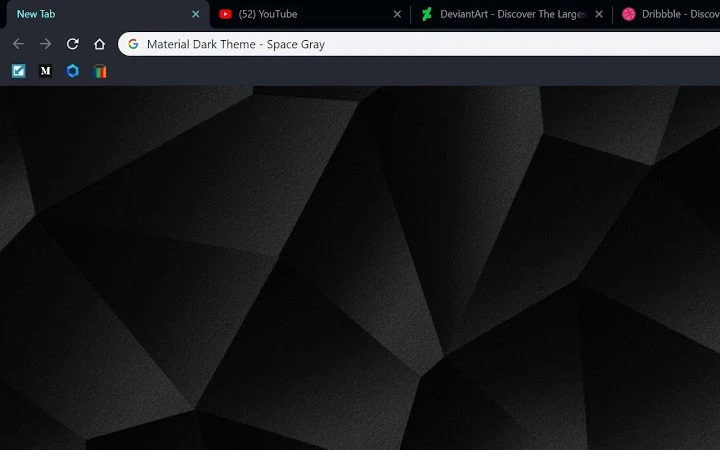

Material Dark Theme – Space Gray
Overview
The Material Dark Theme – Space Gray is a desktop browser extension designed to enhance the visual experience of web browsing through a minimalist, dark interface. Created with a focus on user comfort and aesthetic clarity, it aligns with modern design principles such as Material Design and Windows 10 Dark Mode. The theme aims to reduce eye strain, improve readability, and promote focus during extended use, particularly for users engaged in reading, studying, or creative work.
Targeted at professionals, students, writers, and digital creatives, the theme is optimized for environments where prolonged screen time is common. Its clean, unobtrusive design minimizes visual distractions, allowing users to concentrate on content rather than interface elements. Real-world use cases include long-form reading sessions, coding, content creation, and research work, where clarity and focus are essential.
The developer, Mohammad Reza Abdolhossein, shared that the theme was crafted with care and intention, emphasizing color harmony and interface aesthetics. While specific development background details were not provided, the theme’s design reflects a strong understanding of UI/UX principles. The developer invites user feedback through a dedicated comment section, indicating an ongoing commitment to improvement.
Key Features & Capabilities
- Material Design Integration – The theme follows Google’s Material Design guidelines, ensuring a modern and consistent visual language across browser elements.
- Dark Mode Compliance – Fully compatible with Windows 10 Dark Mode, providing a seamless experience across the operating system.
- Enhanced Text Readability – Optimized font contrast and spacing improve legibility, especially during extended reading or studying sessions.
- Context-Aware Color Schemes – Tabs and interface elements adapt their appearance based on state—active, inactive, or incognito—maintaining visual consistency.
- Focus-Driven Interface – Minimalist layout reduces visual noise, helping users maintain concentration on web content.
- Compact Size & Fast Performance – At just 1.2 MB, the theme loads quickly and operates smoothly without impacting browser speed.
These features support a range of daily workflows, from academic research to creative writing. For example, students can use the theme during late-night study sessions, benefiting from reduced glare and improved text clarity. Writers and developers may appreciate the clean interface when coding or drafting content, as it minimizes distractions. The theme’s lightweight nature ensures it does not slow down the browser, maintaining a responsive experience.
User Interface, Workflow & Performance
The user interface is characterized by its simplicity and consistency. Navigation within the browser remains unchanged, as the theme primarily affects visual styling rather than functionality. The design emphasizes clarity, with subtle gradients and carefully balanced color contrasts that enhance visual hierarchy without overwhelming the user.
Workflow integration is seamless. Once installed, the theme applies automatically, requiring no additional configuration. Users can switch between light and dark modes via the browser’s settings, though the theme itself is designed exclusively for dark mode usage.
Performance details were not specified by the developer. However, the small file size of 1.2 MB suggests efficient resource usage. The theme is expected to have minimal impact on CPU or RAM consumption, typical of lightweight browser extensions. Stability is likely high, given the absence of complex functionality. No reported issues were mentioned in the provided information.
Compatibility & System Requirements
The theme is compatible with both Windows and Mac operating systems, making it accessible to a broad user base. It is designed for use with Google Chrome, aligning with the browser’s extension ecosystem. The software version is 1.0, with a file size of 1.2 MB.
Exact system requirements were not listed. The developer did not provide additional system requirements. Compatibility with older versions of Chrome or other browsers was not confirmed. Installation is straightforward, with no known prerequisites.
Pros and Cons
Pros
- Minimalist design enhances focus and reduces visual fatigue
- Optimized for readability during long browsing sessions
- Small size ensures fast loading and low resource usage
- Complies with Windows 10 Dark Mode for system-wide consistency
- Supports multiple use cases: study, work, creativity, and content creation
Cons
- Only available for Google Chrome (no support for other browsers)
- Limited customization options beyond the preset dark theme
- Developer contact details are shared via external platforms, not directly in the extension
- No information on update frequency or version history
FAQ Section
Is the Material Dark Theme compatible with all web browsers?
The theme is designed specifically for Google Chrome. Compatibility with other browsers was not confirmed in the provided information.
Is this theme safe to install?
As a browser extension published through the Chrome Web Store, the theme adheres to standard security practices. It does not collect user data or track browsing behavior.
How often are updates released?
The release date of the current version is May 15, 2024. No information was provided about update frequency or future release plans.
Can I customize the theme’s colors or layout?
The theme comes with a fixed design based on the developer’s vision. No built-in customization options for colors or layout were mentioned.
Is the theme available offline?
Once installed, the theme functions offline. It does not require an internet connection to operate after initial setup.
Final Thoughts
The Material Dark Theme – Space Gray delivers a refined, focused browsing experience through its minimalist design and attention to readability. It excels in reducing eye strain and enhancing concentration, making it ideal for students, writers, developers, and creatives who spend long hours online. Its compact size and smooth performance ensure it does not interfere with browser efficiency.
While limited to Chrome and offering no customization, its strengths in interface clarity and visual harmony are significant. The developer’s commitment to user feedback suggests potential for future improvements. For users seeking a clean, distraction-free environment for reading, studying, or creative work, this theme offers a compelling solution.
Download Material Dark Theme – Space Gray now to elevate your browsing experience.







